Red Bluetooth Headphones: SD Card, FM Radio, Mic
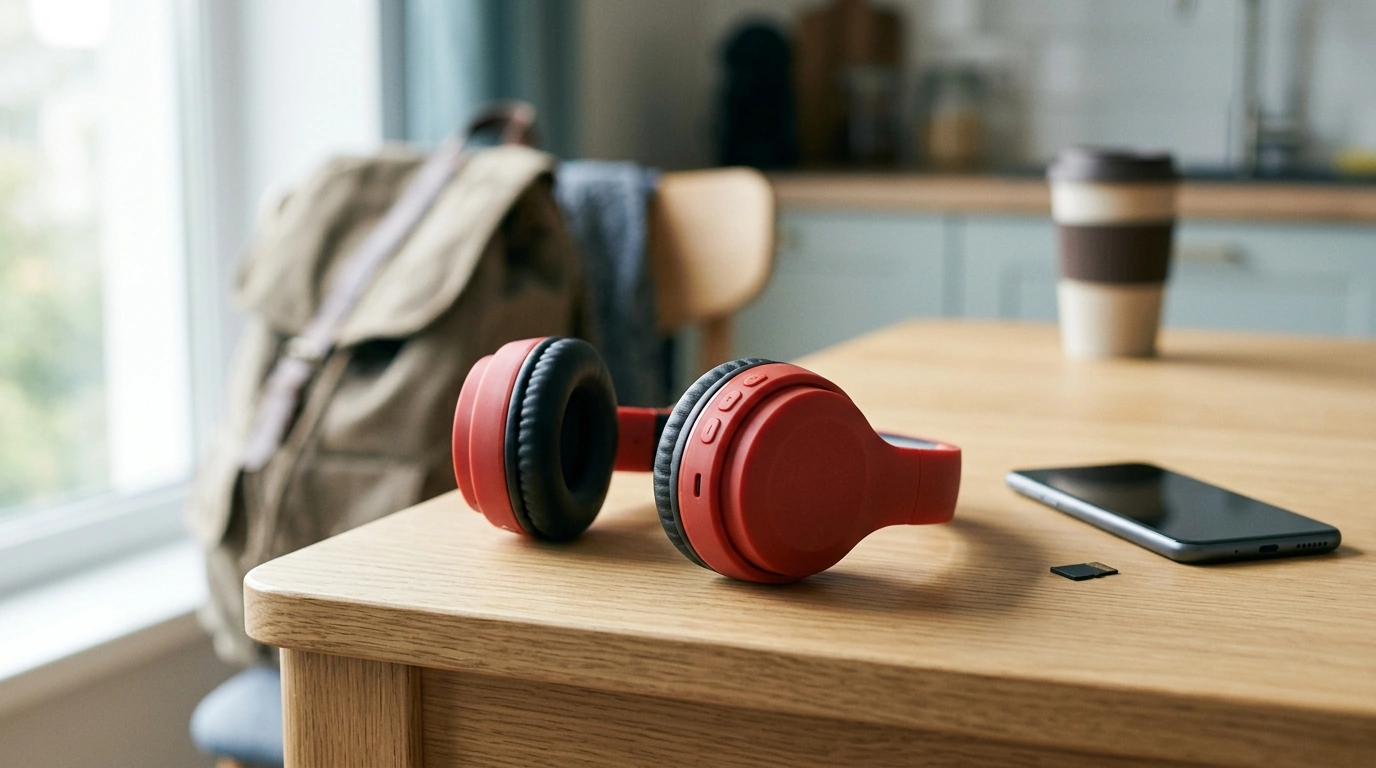
Red Wireless Bluetooth Headphones with SD Card, FM Radio & Mic
These wireless headphones are built for simple, everyday listening with multiple playback options in one compact design. Switch between Bluetooth streaming, SD card playback, and FM radio, and use the built-in mic for calls when connected to a phone. The red finish adds a bold look while keeping the setup straightforward for commuting, workouts, or at-home use.
What These Headphones Are Made For
If you want one headset that can handle more than just Bluetooth streaming, this multi-mode design keeps things flexible. It’s especially useful when data, signal, or app access isn’t guaranteed.
- Wireless listening from a phone, tablet, or laptop via Bluetooth
- Offline playback from a microSD/TF card for travel, school, or backup music
- FM radio listening without needing a phone app
- Hands-free calls and quick voice chats using the integrated microphone
- An easy, budget-friendly option for a spare pair or a first set of wireless headphones
Key Features at a Glance
- Bluetooth mode for wireless audio streaming from compatible devices
- SD card slot to play stored audio without an internet connection
- FM radio function for local stations (signal depends on location)
- Built-in microphone for calls and basic voice pickup
- On-device controls to change modes, adjust volume, and manage playback
Modes and when to use them
| Mode | Best for | What is needed |
|---|---|---|
| Bluetooth | Daily listening from a phone | Bluetooth-enabled device |
| SD card | Offline music on trips | microSD/TF card with audio files |
| FM radio | News/music stations nearby | Local FM signal coverage |
| Mic (calls) | Hands-free conversations | Bluetooth connection to a phone |
Specifications and What to Confirm Before Buying
Multi-mode headphones are convenient, but a quick check of a few details helps avoid surprises—especially for SD playback and charging compatibility.
- Check microSD/TF card compatibility: supported capacity and audio formats can vary by model batch
- FM reception depends on local coverage and indoor/outdoor conditions
- Microphone quality is suitable for casual calls; for professional meetings, a dedicated headset mic may perform better
- Confirm charging method and cable type (commonly micro-USB or USB-C, depending on the production run)
- Fit and comfort depend on head size and ear shape; consider intended wear time (short commutes vs. long sessions)
Product snapshot
| Detail | Value |
|---|---|
| Product | Red Wireless Bluetooth Headphones with SD Card, FM Radio & Mic |
| Primary uses | Bluetooth audio, SD card playback, FM radio, hands-free calls |
| Color | Red |
| Availability | In stock |
| Price | $11.51 USD |
Setup Guide: Bluetooth, SD Card, and FM Radio
Switching between modes is meant to be quick once the initial pairing or station scan is done. Plan to do the first setup at home so everything is ready when you’re on the go.
- Bluetooth pairing: Turn on the headphones, enable Bluetooth on the phone, then select the headphones from the available device list.
- SD card playback: Insert a microSD/TF card with supported audio files; use the mode button to switch to card playback.
- FM radio: Switch to FM mode, then scan/search for stations; if reception is weak, change location for a clearer signal.
- Calls: Once connected by Bluetooth, answer/end calls using the headset control; speak toward the mic area for best pickup.
- If audio cuts out: Reduce distance from the phone, remove obstacles, or disconnect and re-pair.
Everyday Use Tips for Better Sound and Fewer Dropouts
A few small habits can make wireless listening feel more consistent—especially when you’re moving through crowded spaces, commuting, or switching between music sources.
- Keep the connected phone on the same side of the body as the headphone’s main control module to reduce signal blocking.
- For SD playback, use a quality microSD card and avoid corrupted files; reformat the card if tracks do not load.
- For FM, near-window or outdoor listening often improves reception compared with interior rooms.
- Charge regularly and avoid running the battery to zero repeatedly to help maintain consistent performance.
- Store the headphones in a small pouch or case to prevent button presses and dust buildup when traveling.
Who This Option Fits Best
- Students who want an inexpensive headset for music and calls
- Commuters who like having FM radio available without using mobile data
- Travelers who want offline listening from an SD card
- Shoppers looking for a spare pair of headphones for a bag, gym locker, or car
- Anyone who prefers multi-mode playback instead of relying on a single device connection
Related In-Stock Picks
If you’re stocking up on simple, practical everyday gear, these items are also available now:
- Red Wireless Bluetooth Headphones with SD Card, FM Radio & Mic
- Abdominal Wheel for Strengthening Muscles
- Stainless Steel Serving Set
- Adidas Women’s White Faux Leather Sneakers
Helpful References on Bluetooth, SD Cards, and Signal Reception
For deeper background on how these technologies behave in real-world conditions, these consumer-friendly resources can help:
- Bluetooth Technology Basics (Bluetooth SIG)
- SD Card Standards and File System Notes (SD Association)
- Consumer Information on Radio and Signal Interference (FCC)
FAQ
Can these headphones play music without a phone?
Yes. You can play audio directly from a microSD/TF card (with compatible files), or listen using the built-in FM radio mode as long as local stations are available in your area.
What type of SD card works with the built-in slot?
They use a microSD/TF card. Supported capacity and audio formats can vary by production batch, so it’s best to use common formats and confirm the supported limits on the product details before loading a very large card.
Will the microphone work for calls on both Android and iPhone?
The microphone works for calls when the headphones are paired to a phone over Bluetooth, including Android and iPhone models. Call button behavior and pickup quality can vary slightly depending on the phone and its Bluetooth implementation.









Leave a comment